The post Firewall Management appeared first on General Computer Consulting, LLC.
]]>
WHAT IS FIREWALL?
Firewall is a network security device that is designed to monitor unauthorized access to or from the private network. It can be hardware or software. Firewalls prevent unauthorized users from accessing private networks connected to the internet. It provides a barrier to control network traffic. The most important use of a Firewall is to protect your computer or the network from being attacked by internet hackers, viruses, and worms.
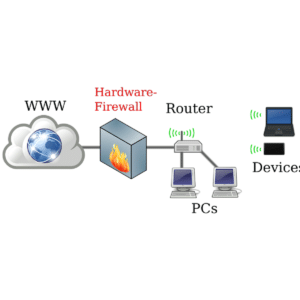
FIVE TYPES OF FIREWALLS:
- Stateful inspection firewalls evaluate network traffic to determine whether one packet is related to another packet.
- Next-gen firewalls use a multilayered approach to consolidate enterprise firewall capabilities with an IPS and application control.
- Packet filtering firewalls evaluate data packets in isolation and don't know the packet's context.
- Application-level gateways inspect packets at the application layer of the Open Systems Interconnection (OSI) reference model.
- Circuit-level gateways provide security by monitoring TCP handshaking between packets from trusted clients or servers to untrusted hosts and vice versa.
ADVANTAGES OF FIREWALL SECURITY:
- Easy installation procedure
- Companies can easily manage websites that can be accessed by employees. Automatically blocking the user from accessing other websites except for the ones provided by the company.
- It can block suspicious IP addresses.
- Protects network from viruses and worms
- It controls the traffic in and out of the network.
- It blocks other computers from accessing programs installed in your computer or network.
- It protects your wireless network (WiFi)
LIMITATIONS OF FIREWALL SECURITY:
- A firewall cannot stop users from access inaccessible websites when they are using malicious codes.
- It cannot prevent users or attackers when they are using a modem if they are dialing in to or out of the internal network.
- A firewall cannot protect a network that is lacking security systemsor measures.
- It cannot always protect your network from h As hackers don’t just attack malware or trojans – they know where exactly to get into your computer or network thus, bypassing the firewall.
FIREWALL VENDORS:
There are different types of firewalls - features and vendors available to choose from based on what your network needs.
- Cisco Firepower Series is an integrated suite of network security and traffic management products, deployed either on purpose-built platforms or as a software solution.
- Barracuda CloudGen Firewall offers a comprehensive set of next-generation firewall technologies to ensure real-time network protection against a broad range of network threats, vulnerabilities, and exploits, including SQL injections, cross-site scripting, denial of service attacks, trojans, viruses, worms, spyware, and many more.
- Fortinet FortiGate combinesthe functionality of traditional firewalls with deep packet inspection (DPI) and machine learning to bring enhanced protection to your network.
- SonicWall Network Security appliance Series provides organizations that range in scale from mid-sized networks to distributed enterprises and data centers with advanced threat prevention in a high- performance security platform.
- Sophos XG Series provides unprecedented visibility into your network, users, and applications directly from the all-new control center.
STEP BY STEP GUIDE TO FIREWALL CONFIGURATION:
Step 1: Secure your firewall. Update your firewall to the latest firmware.
Step 2: Architect your firewall zones and IP addresses. Plan out your network structure so that these assets can be grouped together and placed into networks (or zones) based on similar sensitivity level and function.
Step 3: Configure access control lists Make your ACLs specific to the exact source and/or destination IP addresses and port numbers whenever possible. At the end of every access control list, make sure there is a “deny all” rule to filter out all unapproved traffic. Apply both inbound and outbound ACLs to each interface and subinterface on your firewall so that only approved traffic is allowed into and out of each zone.
Step 4: Configure your other firewall services and logging. Configure the services you wish to use. Disable all the extra services that you don’t intend to use.
Step 5: Test your firewall configuration. Don’t forget to verify that your firewall is blocking traffic that should be blocked according to your ACL configurations. Testing your firewall should include both vulnerability scanning and penetration testing.
Always remember that network security such as Firewall is there to help us protect our computer network. Businesses should think of security measures that are suitable for the company in order to protect their assets. This is where General Technologies, led by Paul General, CEO/Cybersecurity Specialist comes in. We have various cybersecurity program that suits any business size.
Contact us at 412-853-3708 or email us at info@gcchelp.com.
The post Firewall Management appeared first on General Computer Consulting, LLC.
]]>The post Is Your Network Under Attack? Learn The Signs… appeared first on General Computer Consulting, LLC.
]]>
“How would I know if my network is under attack?” is a common question that we receive from organizations.
In addition to this trend, we see these other concerns:
- Are we at risk of a cyberattack? If so, how can we mitigate our risk?
- How much damage could an attack cause to our organization?
Signs Your Network is Under a Cyber Attack:
- Your computer is running noticeably slow, and keeps lagging, crashing, or refreshing by itself.
- Your mouse is moving without your control. It is clicking without your instructions - meaning the hacker is in control of your computer.
- You’re experiencing a significant decrease in your network performance, which is a result of a DDoS (Distributed denial-of-service) attack that was attempted or made on your network. A DDoS attack can involve some guests sent to a single server or a considerable number of connection attempts from many IP addresses.
- You have received error messages that you haven’t seen before. Seeing an error message could be a problem with either your hardware or software causing inaccessible computers and files.
- An increase in number of pop-up ads may appear on your computer. Malware is the type of software that has been installed on your computer without your knowledge.
- You are seeing unfamiliar files on your computer that you didn’t download or create. Malware can do a handful of malicious things, including removal/encryption of files and using your system to send spam emails.
- Your default language, and your browser font size have been changed without your consent and knowledge.
What Can You Do?
We’d recommend partnering with a managed service provider with a cybersecurity-first mindset, like General Technologies. Paul General, CEO, and Cybersecurity Specialist, has a dedicated process with a four-step framework to provide your business with the best cybersecurity services. We can identify, address, and provide solutions for your security concerns, making your business safer all around. Interested in a Cybersecurity Risk Assessment that will expose these underlying vulnerabilities and security gaps?
We’ll run the proper scans, present our findings, offer recommendations, and help you mitigate your cyber risk! Contact us for more details.
The post Is Your Network Under Attack? Learn The Signs… appeared first on General Computer Consulting, LLC.
]]>The post Who needs CYBERSECURITY? appeared first on General Computer Consulting, LLC.
]]>The question now is: WHO NEEDS CYBERSECURITY?
First off, cybersecurity is a type of software that will protect all internet-connected devices, systems, data, and software against cyberattacks. Cybersecurity is a must as you need your data protected. Cybersecurity is imperative in businesses. Regardless of the company’s size, cybersecurity is indeed one of the important parts of their network. In most cases, cybercriminals attack small to medium-sized businesses. They tend to do so because of the lack of security measures that protect and guard their network system which make it quite easy for them to grab and steal a business’ sensitive data.
Why is it important?
The explanation of why it is important is quite simple; it is to safeguard your business from internet-based criminals. Cybersecurity will protect your business from data breach/loss, computer damage and/or network/system damage.
A business that has a strong and stable cybersecurity system that will make them a hard target. Establishing a strong and stable cybersecurity system will save your business from cyber-attacks.
Cybersecurity benefits
- Secured data and network system
- Preventing unauthorized access to sensitive data
- Increases recovery time after a data breach
- Increases business reputation and stability
- Protection of your network from cyberattacks such as malware, ransomware, phishing, etc.
SUMMARY:
Businesses are the ones vulnerable from cyber attacks, therefore cybersecurity enhancements and improvements should always be the IT priority. Cybersecurity can protect your assets and saves you hundreds of dollars and your company too. It is an investment that is worth every penny of your business.
For Cybersecurity inquiries, we have different packages that will surely fit your business needs. Feel free to contact us and we’ll be more than happy to set up a quick meeting with you to discuss further.
Call us at (412) 990-1414 or email us at info@gcchelp.com.
General Technologies – “Your total outsourced I.T. solution”
“We DO I.T. so you don’t have to”
The post Who needs CYBERSECURITY? appeared first on General Computer Consulting, LLC.
]]>The post What is a router and its benefits? appeared first on General Computer Consulting, LLC.
]]>To make it simple, a router is a device that connects different devices within the network to transport data packets that can be sent between devices and/or to the internet. The router can be connected to two networks – LAN or WAN and ISP networks.
NOW aside from being able to connect different devices, what other benefits can you get from your router?
1. Internet sharing
As we have mentioned above, you can connect different devices using a router and be able to get on the internet all at the same time. In the case of businesses, since they have too many devices that need an internet connection, they normally install additional routers to support the demand.
2. Network security
Though routers are not the same as a firewall that can block malware, still routers are an important device to establish the security of the network against some viruses and cyber threats.
3. Network traffic
In a network where there’s no router, the network traffic can be horrible. It will result in slow internet connection. But with the use of a router, it can reduce network traffic by creating 2 domains – collision domains and broadcast domains.
SUMMARY:
The router is one of the important parts to build a strong and secure network system. For businesses, it is one thing that needs consideration to provide a stable and reliable internet connection. Choosing the right router will have a great IT impact on your business.
For router installation or repair, General Technologies can provide you the highest quality your business deserved! Feel free to call us at (412) 990-1414 or email us at info@gcchelp.com for immediate assistance.
General Technologies – “Your total outsourced I.T. solution”
“We DO I.T. so you don’t have to”
The post What is a router and its benefits? appeared first on General Computer Consulting, LLC.
]]>The post How to maintain your network security appeared first on General Computer Consulting, LLC.
]]>Businesses must consider performing preventative maintenance to maintain tight network security. There are simple ways to maintain your network security and you and your staff can definitely do it.
Here’s some of the basic maintenance to keep your network security:
1. Keep your Operating System Up To Date
Your operating system is the lifeline of your network. Therefore keeping your operating system up to date will increase the network security. Patches should be updated too to make sure that there are no loopholes that will allow cyber threats to come in.
2. Keep your Antivirus and Malware software updated
Your antivirus and malware is your network’s best “bodyguard”. As long as they are updated, they’ll keep your network secured and protected from viruses and cyber attacks. Your antivirus/malware software can detect malicious activities in no time and they can block it as soon as detected.
3. Conduct a Network Audit
There are different devices connected to your network system – routers, switches, computers, wireless access points, mobile devices, etc. Conducting a regular network audit will allow you to manage all devices that are connected to your network thus making sure that no unauthorized devices are connected.
4. Upgrade or update your Firewall
The firewall is your network’s best defense in blocking unauthorized access to malicious sites or unauthorized sites. Keeping this device updated will definitely mean protection on your network. Always keep your firewall security setting current. Make sure to use a strong, encrypted password to protect your network data.
SUMMARY:
Network security is clearly one of the vital parts of your network system. Disregarding your network security is a business loss. There is too much data and business information stored on your network and these are the things that need protection against cyber threats and attacks. Keep your network security in its best shape.
For network security inquiries, General Technologies can definitely help you out. Just give us a call at (412) 990-1414 or email us at info@gcchelp.com for a free consultation and quotation.
General Technologies – “Your total outsourced I.T. solution”
“We DO I.T. so you don’t have to”
The post How to maintain your network security appeared first on General Computer Consulting, LLC.
]]>The post HOW TO… Recommended steps after a Ransomware attack appeared first on General Computer Consulting, LLC.
]]>
As we all know, hackers and other cybercriminals are becoming wiser and have lots of tricks that make unprotected people fall victim. In our previous article, we have shared with you the description of ransomware.
With that, Ransomware is a type of cyber threat wherein the hacker will ask for money in exchange for the information they got from you.
Today, we give you some recommendations that you need when in a situation of a ransomware attack.
1. Keep your cool
Understandably, most of the time when we get into a difficult situation, we tend to panic. The first thing we must learn is to relax and keep our cool. The more we panic, the less we can think clearly. When you suspect a ransomware attack, take a deep breath, gather your thoughts, and start checking your network. Do not jump to conclusions. Also, keep in mind that paying the ransom amount doesn’t guarantee that you’ll be able to retrieve your lost data.
2. Turn off and disconnect your equipment
When you suspect a ransomware attack, immediately disconnect your equipment and turn it off. Ransomware is like a contagious disease that can spread in an instant. Disconnecting your equipment such as your router, computer, and WiFi might decrease the chance of spreading the damage.
3. Gather and check the damage
This is the hardest part you must undergo. If you’re not a tech-savvy person, it would be in your interest to seek assistance from an IT expert to figure out what information was taken in the attack. Once this is determined an IT expert can recommend the next step you should take to protect what you have lost.
4. Retrieve your data
Once you or your IT expert have assessed the damage from the attack you may slowly retrieve the stolen data back to your network. This would consist of the retrieval of your files, passwords, websites, and /or infected computers. By having a disaster recovery plan before the attack you would make this step much simpler with a backup.
5. Remove the virus
The virus must be removed before reactivating your network. You must trace down each piece of your equipment that has been infected so you can isolate it and provide proper repair.
6. Review and strengthen your security measures
After getting attacked by ransomware, know exactly where it came from. Review your security measures and strengthen them by adding software or a device that will expand and provide extensive security within your network.
SUMMARY:
Losing data due to a ransomware attack is one of the most difficult things that may happen to your business. But with the proper knowledge and a backup system your business to rise again in no time. Always keep in mind that having tight network security will give a low percentage of cybercriminals to penetrate your network system. Giving attention to your security measures can save your business from cyber-attacks.
General Technologies can offer you a variety of cybersecurity packages to suit your business needs. Reach out to us and we will be more than happy to set up a meeting to discuss your needs.
Contact us at (412) 990-1414 or send us an email to info@gcchelp.com.
“We do I.T. so you don’t have to”
The post HOW TO… Recommended steps after a Ransomware attack appeared first on General Computer Consulting, LLC.
]]>The post Tips on how to strengthen your Network Security appeared first on General Computer Consulting, LLC.
]]>We have compiled the tips you may consider to strengthen your business’ Network Security.
1. Firewall
First on your list should be your Firewall. Firewall blocks any access to malicious sites and apps. Cyber threats are coming from untrusted websites or simply from email attachments. By having a properly configured Firewall, there’s no way for users to access malicious sites and contents as it will automatically block the user from getting in.
2. Update your network equipment
Using outdated network equipment is not advisable most especially these days where cyber threats are becoming stronger and wiser. All network equipment has the ability and option to get upgraded. By regularly updating your equipment such as router, switch, firewall, and etc. you will get an additional security and protection.
3. Imposed a Password Policy
Password is one of the key factors to keep your network secured from cyber threats. Based on study, hackers penetrates to network that doesn’t have strong password. They can easily get in into the network and if this happens, you can say “good bye” to your data and worst to your business. Therefore implementing a strong password policy to every user is very important.
4. Cyber Security Orientation / Training
Users must be equipped with training and orientation about cyber security. Educating all users to know how protect your network will help them save the business as well. They must know all the precautions to take for them not to be a victim of cyber threats. Empower your users with knowledge and tools.
5. Never allow non-work related internet access and downloads
By accessing unauthorized websites and downloading malicious apps or files can put your network at risk. Most hackers and other internet threats linger from untrusted websites and illegal downloads. Only allow your users to use their devices for work-related things.
SUMMARY:
The growing number of cyber threats is the main antagonist for businesses. Having a strong, reliable, and stable network is the key to keep your business in the game. Every network has its own loophole, but do not let this loophole ruin your business and in risk. Always have a scheduled preventative maintenance to make sure that your network is in good position over cyber criminals. Think ahead of them and your business will be safe.
Are you looking for I.T. experts to look after your Network Security? Don’t go any farther… General Technologies got your back!!! We have various cyber security plans that will surely fit on your business. We can personalize the program based on what your business’ need.
Contact us through (412) 990-1414 or send us an email to info@gcchelp.com.
“We do I.T. so you don’t have to”
The post Tips on how to strengthen your Network Security appeared first on General Computer Consulting, LLC.
]]>The post Most common technology issues small businesses are facing appeared first on General Computer Consulting, LLC.
]]>We have listed below the most common technology issues small businesses are facing…
1. Data Recovery System / Backup System
Businesses have tons of data to store, whether it is a small or large business. Large businesses definitely have more data compared to small businesses but the procedure is just the same. Having no data recovery system will put your business at risk in a time of data loss most especially in the event of a natural disaster such as fire, flood or earthquake. The data recovery system will also allow the business to get back their data in case of data loss due to hacking or other cyber threats.
2. Upgrades – System, hardware, and software
We must face it; technology is as efficient as it can be when it is upgraded. Continuous innovation gives businesses the best of technology they can ever have. Old systems had difficulties incorporating new systems. Upgrades are there because of the changes in the technology and it will provide the business more efficiency and security.
3. Network/System Security
Small businesses are prone to cyber threats because cybercriminals are aware that they do not have the facility to secure their system. Small businesses are most targeted due to lacking security measures. Small businesses must understand that it would be even harder once your entire networking system will get compromise by cyber threats. It would be harder to bounce back as it will surely cost you hundreds or maybe thousands of dollars. Network security should be the top priority to ensure the safety of your data as well as your employees.
4. Preventive Maintenance
Do not wait for your office equipment to break before replacing them. Keeping your hardware in its best condition will save you money from replacing them sooner than it is expected. Having preventive maintenance will keep your equipment fresh and will definitely last longer.
SUMMARY:
Facing technology issues is difficult as it can be. Business owners must understand that managing their technology will give them the advantage over competitors and to keep their business updated and moreover on top of the competition. Technology changes day after day, so make sure that your business is always updated.
Is your business looking for a Managed I.T. Service Provider to take care all of your I.T. needs? General Technologies is here to help you out. Not only we provide quality service but we also work with your team to provide you the latest and up-to-date technology system that will not max out your budget.
TALK TO US!!! You can call us at 1-412-853-3708 or simply send us an email at info@gcchelp.com.
“We do I.T. so you don’t have to”
The post Most common technology issues small businesses are facing appeared first on General Computer Consulting, LLC.
]]>The post Tips on how to increase internet security in your workplace appeared first on General Computer Consulting, LLC.
]]>We’ll share with you some basic but essential tips on how to increase internet security in your workplace:
1. Password security
Password is one of the basic precautions that sometimes get disregarded. Employees tend to set up easy passwords and too lazy to create a complex one. Set up your email client or other online systems to set up a password with a few requirements. For example, it must be an 8-digit password, a combination of letters and numbers, and must include a special character. Set up an automatic password change like every 3 months or 6 months, whichever works for your business – this should prompt automatically to your employees’ computer and will not allow them to use it unless a password has been changed.
2. Install a Firewall
We must admit, employees tend to get bored when working on some heavy projects or tasks and to cut this off, they browse websites that could be a threat to your company’s network system. By installing a firewall, it will block the users from accessing unauthorized websites.
3. Never allow any downloads not made by your I.T. team
Have your I.T. team design a system that will not allow unauthorized downloads especially non-work related ones. This will lessen the possibility of getting computer viruses or get attack by hackers.
4. Do not allow your employees’ personal device to be connected on your network
Though, we understand the need for employees to bring their personal devices like mobile phones at their workplace it sometimes the source of security risk. If you will allow your employees to bring their personal devices at work, make sure that they will not get to be connected to your network. But, for fun and stress-free workplace, set up a separate network where your employees can connect to the internet.
5. Educate your employees about network security
Sometimes, after all the precautions that your company did to secure the network, it can always boil down to employees’ awareness. Educate them properly about network security, the risk, threats, and effect once the network has been jeopardized. Let your I.T. team discuss everything about the security and precautions that the company is taking to avoid a security breach. Work with your employees and let them feel secure and protected.
SUMMARY:
Network security is highly important to keep your business up and running. It will also determine how secured and protected your employees are. Make sure your company exercise security precautions and making your employees happy and efficiently working.
Should your company needs assistance in building network security, General Technologies have different packages that will surely fit your company’s needs. Just contact us through (412) 990-1414 or simply send us an email at info@gcchelp.com for immediate assistance.
“We do I.T. so you don’t have to”
The post Tips on how to increase internet security in your workplace appeared first on General Computer Consulting, LLC.
]]>The post Things you must do after a Data Breach appeared first on General Computer Consulting, LLC.
]]>But what happens when you think your information has been compromised? What would be your next step?
We have listed below the things that may help you to bounce back after a data breach.
1. Know exactly what information has been stolen
After knowing that your information has been compromised, keep your cool and start organizing everything. First, know exactly what information that hacker has stolen from you. Would it be just a plain name and address? Or more sensitive information such as birthdate, credit/debit card, Social Security Number or other bank details? If, for example, your bank details – call them immediately and have them temporarily deactivate your account until the issue is fixed.
2. Create new and stronger passwords
Setting up new and stronger passwords must be the next thing you must do after a data breach. If you have online accounts that you think have been hacked, immediately change your password to a more complex but easy to remember password. It is also a lot safer if there’s an additional authentication code that can be added to your account.
3. Update your security system
Once you have confirmed a data breach, you must check your security system. Check if your anti-virus software is updated or if you think you need a different one, check the internet of which anti-virus software fits your online activities. Install a firewall if needed, it will increase your network security by blocking malicious sites and other types of viruses.
4. Get assistance from the professionals
Let’s say it is your online accounts such as credit/debit card has been compromised, call your financial institution to report such incident. Ask them to deactivate your account temporarily so that it can’t be used in an illegal transaction. If it’s your SSN, contact the police. Worked with them in regards to your SSN. Stolen SSN might lead to identity theft.
5. Call an I.T. expert
It is always better to seek for assistance from I.T. experts who know exactly what to do after a data breach; you can also ask for their recommendations on what kind of network security fits you.
SUMMARY:
Hackers are getting bigger and stronger that is why you have to keep an eye on them. Perform a regular security check on your system. Do not share any confidential information with others. Do not use untrusted sites if you are connected to a public WiFi or limit your transaction or activity online.
For any inquiries and/or I.T. assistance, talk to our Professionals now and experience the best I.T. service in town. Call us at (412) 990-1414 or send us an email at info@gcchelp.com.
“We do I.T. so you don’t have to”
The post Things you must do after a Data Breach appeared first on General Computer Consulting, LLC.
]]>